Skip to content

Changelog

Jun172026
management

Agentic PR attribution: crediting the human owner

When a coding agent does the work but leaves no trace of co-authorship, that change used to land with no human attached to it. A real, merged PR that no one was credited for.

Starting today, Mesmer runs post-attribution. When agent-authored work carries no co-author, we assign the responsible human by walking a fallback chain until someone is found.

How the fallback chain works#

Credit goes to the first role present, in order:

  • Opener — whoever opened the pull request.
  • Assignee — the assigned owner, when there's no opener to credit.
  • Merger — whoever merged the change.
  • Approver — the reviewer who approved it.
Jun152026
diagnosissettings

Configurable weekends for teams with non-standard weeks

Mesmer used to treat Saturday and Sunday as everyone's weekend. For a team that doesn't work a Monday–Friday week — rotating shifts, a Friday/Saturday weekend, a compressed four-day schedule — that meant real working days were read as quiet and real days off were read as work. The calendar didn't match the team, so neither did the read on it.

Now you can tell Mesmer which days your organization actually works. Under Organization Settings → Days off, toggle any combination of Monday through Sunday. Mesmer leaves those days out when it reasons about productivity and activity, and the AI assistant reads the same work calendar when it interprets your metrics.

What you can do#

  • Set any weekend. Toggle any combination of Monday–Sunday as non-working — a Friday/Saturday weekend, a single rest day, or a four-day week.
  • Get a calendar-accurate read. Effort and activity stop counting your real days off as silence, and stop reading your real working days as idle.
  • Keep the assistant in sync. The AI assistant interprets metrics against the same work calendar, so its answers match the week your team actually keeps.
Jun122026
mcpintegrations

Mesmer's MCP is ready for your agents

Point any MCP-compatible client at our MCP and you can query your Mesmer engineering data right from the chat.

With it you can:

  • Stay up to date on ongoing projects.
  • Get metrics and insights on engineering performance.
  • Use this data alongside any other tools your client has.

To install: pick your client#

One click install:

Snippets for manual installation:

macOS~/Library/Application Support/Claude/claude_desktop_config.jsonWindows%APPDATA%\Claude\claude_desktop_config.json
{
  "mcpServers": {
    "mesmer": {
      "type": "http",
      "url": "https://mcp.mesmer.co/mcp"
    }
  }
}

Quit and reopen Claude Desktop. The first time you invoke a Mesmer tool, a browser tab opens for OAuth — sign in to your workspace to authorize.

If something's off#

  • VS Code uses servers, not mcpServers. Pasting a Claude or Cursor config into VS Code silently produces no tools and no error — the schemas diverged early and never reconciled.
  • Quit and reopen after editing the config. Claude Desktop and Cursor don't hot-reload mcp.json. A fully fresh launch is what picks up the change.
  • Session expired? The browser tab reopens automatically. Re-authenticate there — no token to rotate locally.
  • Older client version? Wrap the URL with the stdio shim: npx -y mcp-remote https://mcp.mesmer.co/mcp.
  • Still stuck? Email support@mesmer.co with the client name, version, and the config block you pasted. We'll get it.
Jun112026
management

Briefings now have a project view

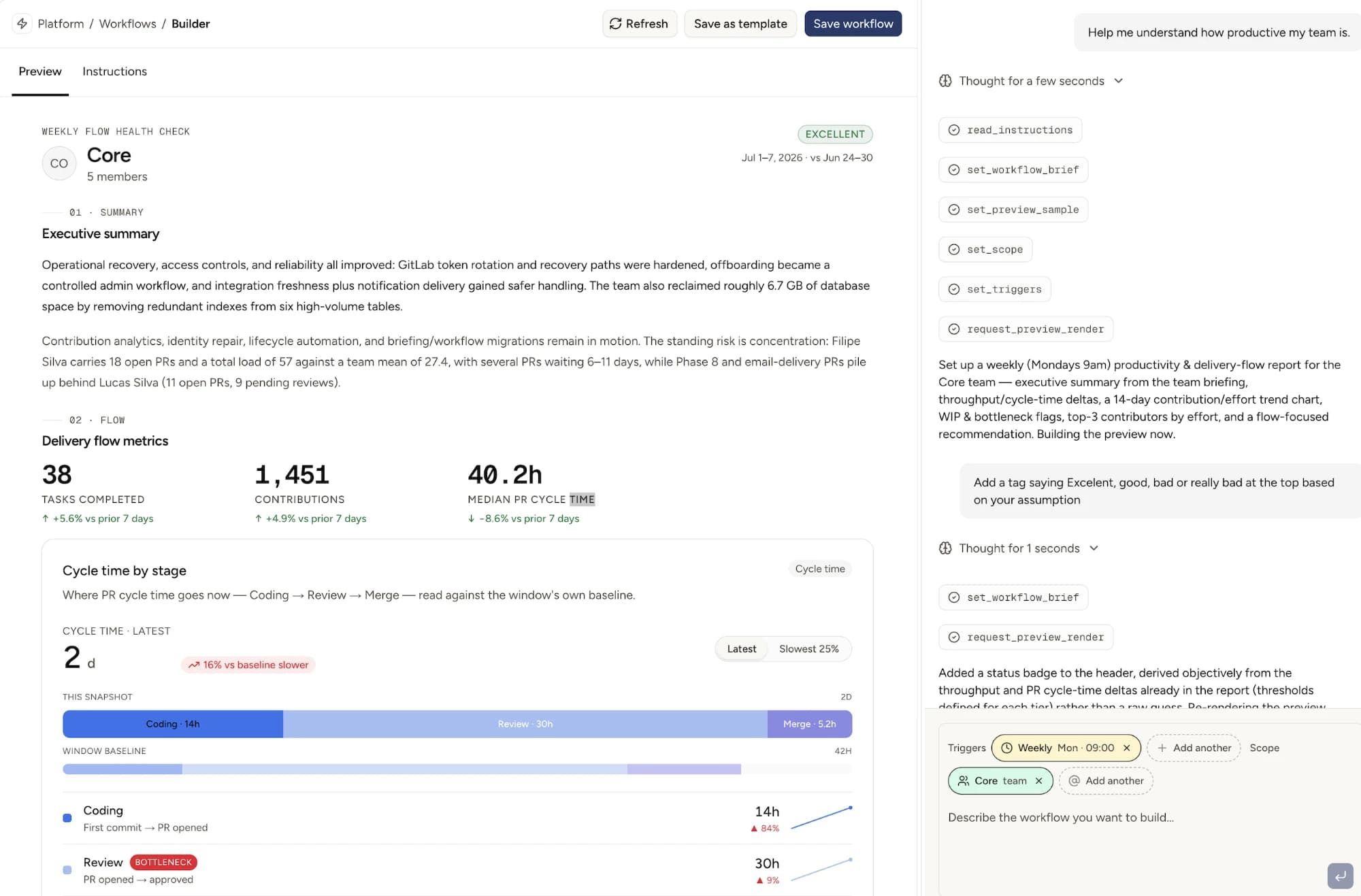
Briefings now have a project view. Mesmer's auto-generated briefings used to roll up only by org, team, or individual employee, which is useful for stand-ups and management reviews but awkward if you wanted to ask "where's project X actually at this week?" You'd have to triangulate across a handful of people. You can now pull a briefing scoped to a single project: what shipped, what's still in flight, next actions, and links back to the actual contributions feeding the summary.

Finding a project briefing from the Organization Briefings tab.

What's new for users#

  • The Organization Briefings tab now groups updates by project, with click-through to a per-project briefing page.
  • Briefings are more correct in places they used to be fragile. We made sure that all contents reflect the right status and titles, and errors are now flagged instead of hiding projects with errors from the view.

When the project view earns its keep#

  • A project lead checking weekly status without pinging four engineers.
  • A manager prepping for a project review and wanting a defensible "here's what landed" rundown.
  • Retros where you want to see what shipped on Project X over the sprint, not what each contributor did separately.
  • Stakeholders outside engineering who care about a specific initiative, not the team behind it.
Jun102026
diagnosis

PR Quality grades on every merged change

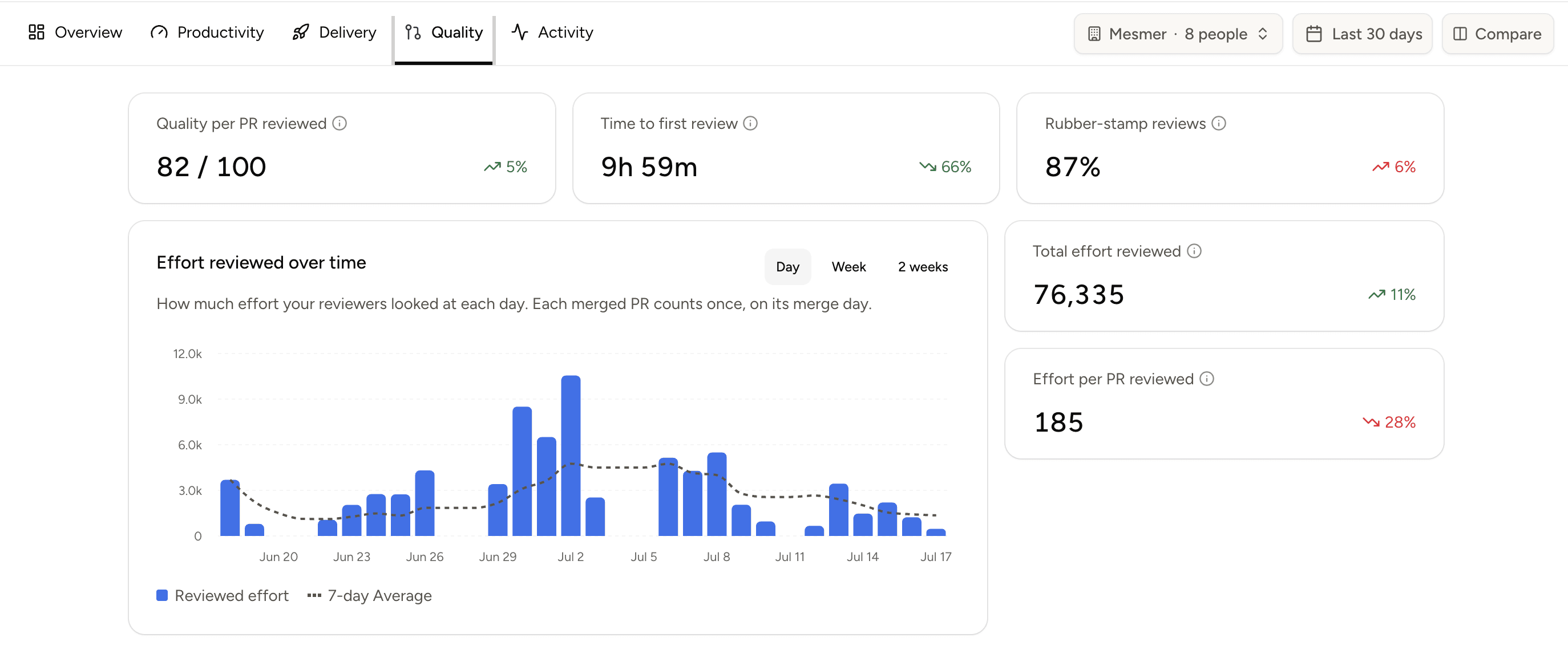
Every merged PR in Mesmer now gets a quality grade from 0 to 100. Each tagged with a severity (critical, high, medium, low).

Walking through a PR Quality grade in Mesmer.

A few things worth knowing:

  • Grades only appear after a PR is merged.
  • Alongside the absolute grade, we show how each PR sits against your team's 90-day baseline: above, on, or below average.
  • The PR detail page has a "Why this grade" breakdown with points deducted, the size factor, and every finding linked to its diff line.
Jun92026
effortdiagnosis

Know if your team's effort is seeing the light of day

Not all work gets shipped. This is more true now than ever, with agents drafting PRs automatically. Discarded work is a healthy part of many agentic workflows, but it should be in its own category when analyzing the work of your team.

Now you can do this in Mesmer, whether working directly with the platform’s assistant or with MCP. You can break down all work into released, not released, and discarded. Discarded work includes all closed, abandoned, or superseded PRs.

Since discarded work is still work, it will still be considered in the platform’s Overview and Statistics graphs.

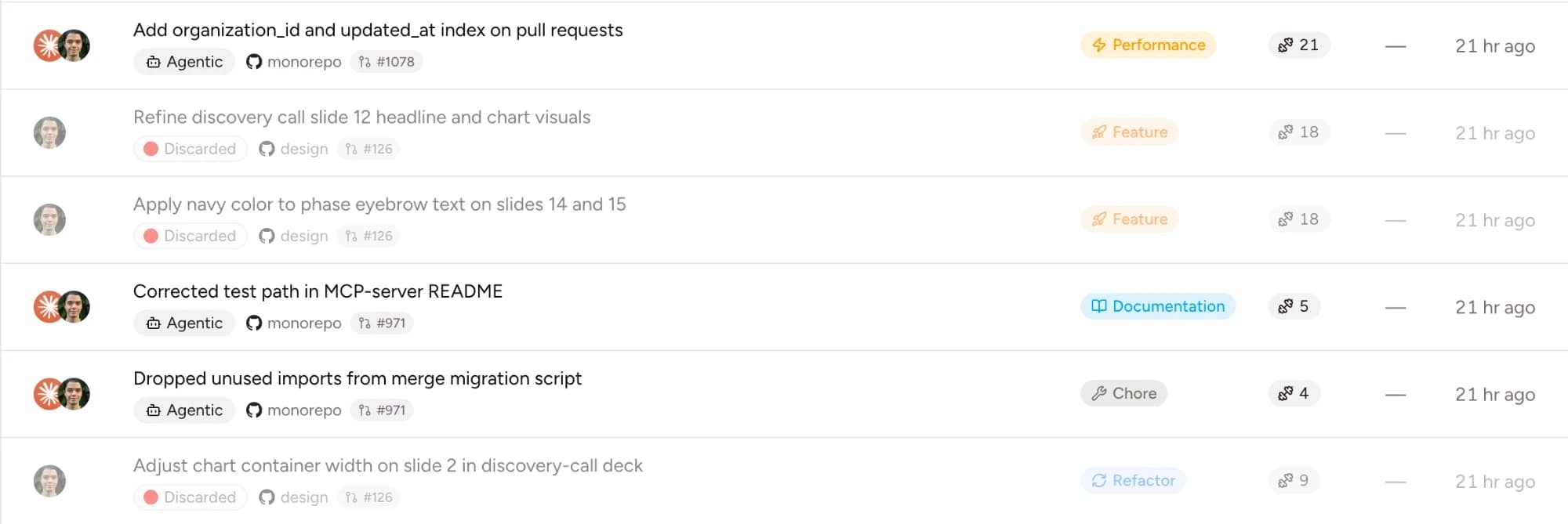
Mesmer contributions list showing six pull requests. Each row carries a status badge — three are marked Discarded (red dot) and three are marked Agentic — alongside the repository (monorepo or design), PR number, work category (Performance, Feature, Documentation, Chore, or Refactor), an effort score, and how long ago it landed. Discarded PRs sit inline with the rest but are clearly labeled.
Work in Mesmer broken down by status. Discarded contributions — closed, abandoned, or superseded PRs — are labeled inline alongside released work, each still carrying its category and effort score.

What this unlocks#

  • Every contribution is now either released, not released, or discarded, which makes discarded work useful at every level.
  • You can use discarded work as the center of your analysis to see where it concentrates, or instead look at individuals or teams with discarded work as one of many datapoints.
  • Dig deeper to the contribution level, to understand what type of work is getting discarded.
Jun82026
effortdiagnosis

Effort recalibration

Scores tended to be compressed. Most work landed in a narrow band in the middle, so a trivial change and a hard one looked closer than they actually were. The new model fine tunes our parameters to widen things out.

Effort scale · recalibrated
Before
After
low efforthigh effort

How effort is scored#

Three inputs feed the score. The first is structural — how big the change actually is. Lines, files touched, how nested the code is, how spread out the work is across the codebase. File types are weighted differently too: docs count less than application code, for example.

The second is cognitive — how hard the code is to follow once you sit down with it. Nested loops, branching, decision points. Part of this read is done by a model that looks at the actual code rather than just counting symbols.

The third is semantic. A bug fix and a chore and a new feature aren't worth the same, so we apply a small adjustment based on what kind of change it is.

What to expect#

  • Low-effort work scores lower than before. Small mechanical changes read as small.
  • High-effort work can exceed the old ceiling. Genuinely hard changes aren't capped anymore.
  • The middle thins out, so the score is a clearer signal of how hard something actually was.
  • All effort metrics after June 1st 2026 are now using the new calculation, this means we recalculated the effort of the first 5 days of June.

If you want more detail around these changes or how we handle effort feel free to reach out to support@mesmer.co.